Macsusc
Moderators
-
Joined
-
Last visited
Everything posted by Macsusc
-
We had some requests for being able to exchange Relics to Lucky Points. You can now convert relics to Lucky Points at a ratio of 500 to 1, this is in line with the cost of our Lucky Point booster packs. Let me know if you have any feedback or issues in the comments 🙂
-
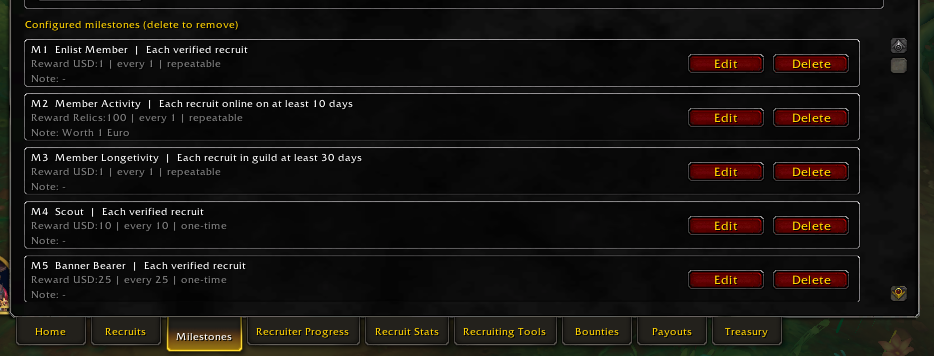
When you start the addon which you can get from here https://www.thecrimsonmarket.com/hub/files/category/13-addons/ You will see a Milestones tab, this is for recruiters. What you are seeing here is incentives to help us grow the guild. That's $1 for every person who joins, $100 relics (1 euro) for every person who is online atleast 10 days, $1 for every recruit who is in the guild for atleast 30 days. That's a total of approx $3 per person you recruit, that means you can earn $300 for recruiting 100 people. But wait there's more! There are milestones for 10, 25 and 50 recruits, coming in at $10, $25 and $50. Guys, I know this is awesome and an easy way to make some additional cash but please also try to source good player or atleast try to identify what type of players you are inviting, it would be good to know if the players are interested in Raids, PvP, Dungeons or what they bring to the table. For now, every single person in the guild is able to invite people and take advantage of this. We have $500 USD and 20,000 relics (200 EURO) in our guild Treasury for pay outs. After this is finished, we will evaluate the results and adjust accordingly to refill the Treasury. Let's make this the biggest WoW guild on the planet!
-
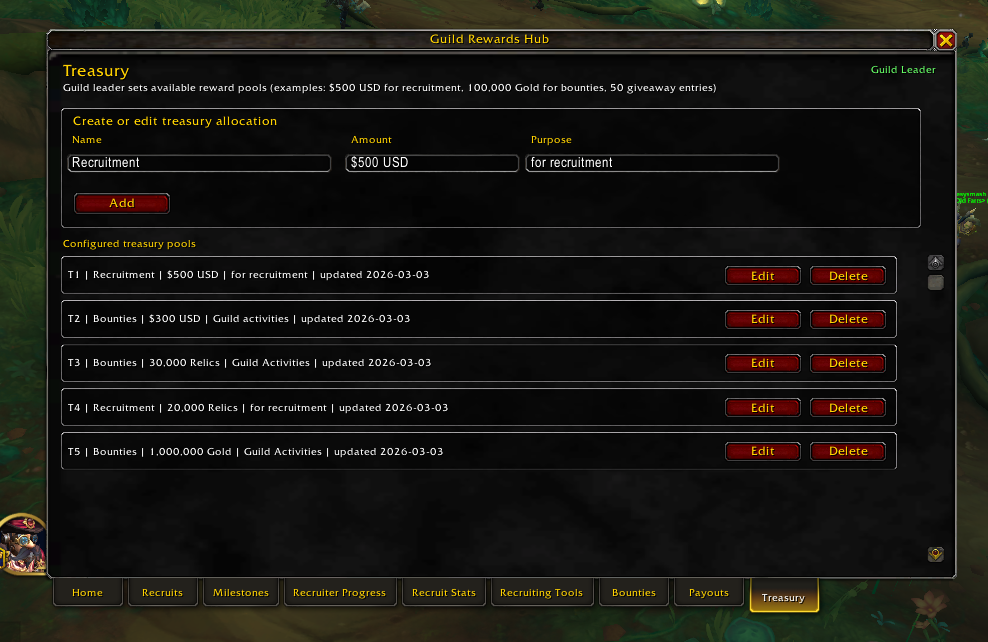
- Edit - Curseforge approved it -> https://www.curseforge.com/wow/addons/guild-rewards-hub Until curseforge approves it which should be a couple days we can download it and use it from here https://www.thecrimsonmarket.com/hub/files/category/13-addons/ Let me know if you find any bugs etc as we build this out. There are huge incentives for recruiters and bounty hunters. Recruiters: check the Recruiter Incentives tab in the club. Bounty Hunters: check the Giveaways/Bounties tab in the club. Here's our current budget for this in our Treasury in the addon. Once we empty this, we will re-evaulate everything and refill the Treasury 🙂
-
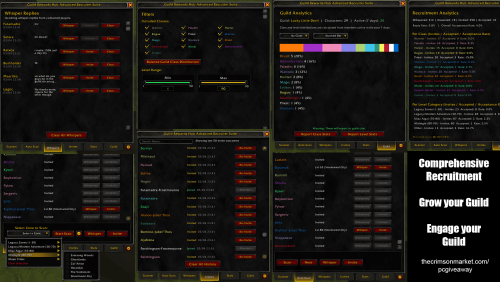 Also available on CurseForge -> https://www.curseforge.com/wow/addons/guild-rewards-hub Addon installation process is the same as all addons. Extract the file contents into your World of Warcraft/_retail_/Interface/AddOns folder. Guild Rewards Hub - World of Warcraft Guild Giveaways and Bounties Guild Rewards Hub is a World of Warcraft addon built for guild leaders, officers, and recruiters who want to run a high-trust rewards program with fast payouts, clear milestones, and fun community events. This addon helps your WoW guild manage: - Recruit tracking and recruiter attribution - Milestones and reward rules - Bounties for raids, PvP, Mythic+, and community activities - Unified payout workflows for recruiting and bounty claims - Treasury budgeting across gold, cash, and giveaway entries - Recruiting tools, including who/whisper/invite support Why Guild Rewards Hub Guild Rewards Hub is designed for guild growth, retention, and transparency. It gives leaders a practical way to run structured giveaways and bounties while keeping budget decisions visible and payout actions consistent. The goal is simple: build a fun guild culture where members stay active, know how rewards work, and trust that payouts are handled quickly. Best Place for WoW Giveaways and Bounties Join our parent World of Warcraft club for guild news, event calendars, giveaways, and bounty updates: https://www.thecrimsonmarket.com/hub/clubs/20-world-of-warcraft This is where the best World of Warcraft Guild of Giveaways & Bounties exists. ------------------------------------------------------------------ World of Warcraft guild giveaways, WoW guild bounties, WoW recruiting addon, WoW payout tracker, WoW milestone rewards, WoW guild treasury, WoW guild management addon, guild giveaway events, WoW event calendar, World of Warcraft rewards system.Free
 -
Complete Midnight Lumberjack Housing achievement and post a screen shot here. Learn about relics here https://www.thecrimsonmarket.com/relic-info Addon is on CurseForge -> https://www.curseforge.com/wow/addons/guild-rewards-hub Make sure to track it with the addon, if it doesn't track properly, let us know here so we can fix it! - Addon is available here until CurseForge approves it -> This is for the housing people! Claimed by Bouncindan (BabyBubble)
-
Claimed by mashiro! Make sure to track it with the addon, let us know if it doesn't track the event so we can fix it. Learn about relics here https://www.thecrimsonmarket.com/relic-info Addon is on CurseForge -> https://www.curseforge.com/wow/addons/guild-rewards-hub Addon is available here Drop a screenshot here.
-
Make sure you track it with the addon, if that doesn't work, let us know in a comment here so we can fix it. Addon is available here until CurseForge approves it -> Drop a screenshot here as well of your score.
-
Claimed by Mashiro! If the addon does not track the kill, please let us know below so we can fix it. Drop a screen shot of the kill here either way. Addon is available here until CurseForge approves it ->
-
CLAIMED BY MASHIRO Drop a screen shot here of the kill and make sure you have tracked it with the addon. If the addon failed to work then mention the details here so we can fix it as we work to make this addon better for our community. Learn about relics here https://www.thecrimsonmarket.com/relic-info Addon is on CurseForge -> https://www.curseforge.com/wow/addons/guild-rewards-hub Addon is available here
-
Who's a PvP god here? Can we find some more? - Claimed by Mashiro! $100 AUD converted by PayPal to your currency! Nice work 🙂
-
If the above does not work. Then we do this Do This Exactly Step 1: Download Latest BIOS On another computer: Go to Gigabyte support page for B850 AORUS ELITE WIFI7 Download latest BIOS Extract file Rename BIOS file to: GIGABYTE.bin (Required for Q-Flash Plus) Step 2: Prepare USB Format USB to FAT32 Copy only the renamed BIOS file to root Step 3: Flash BIOS Turn PC off Leave PSU plugged in and switched ON Insert USB into the white Q-Flash USB port (rear I/O) Press the Q-Flash Plus button The small LED should start blinking. Do NOT interrupt. Wait until blinking stops completely. Step 4: After Flash Completes Clear CMOS again Install one RAM stick in A2 Boot Since the computer was booting before, what may have happened is during your windows update, you either had the PC turn off due to a power surge or someone turned it off or it corrupted the BIOS for some othe reason. If we re install the bios and clear the cmos and it still does not run, I think we need to get either a new CPU or new ram sticks.
-
Install just ONE stick in A2, second from the CPU cooler. While the PC is off. Then boot it up, send a pic of the motherboard at this time. If it doesn't boot, use the other ram stick in A2.
-
Can you take a photo of the ram sticks and the positions they are seated in? They should be in A2 and B2
-
@Cat_Dad8311 do not give up, everything in life takes a bit of effort, this type of stuff happens to everyone, we just need to get through it together and we will. We can order you new RAM we just need to confirm that the RAM is dead, the computer initially booted up for you and went into a Windows update correct? It is very strange that the RAM would have suddenly had a fault after this. We just need to make sure that the RAM 100% needs to be replaced before we make the order for you. Can you confirm that you were taking the RAM out and reseating it with the computer OFF before turning it ON again? @AlmightyWaffles can you please double check the motherboard manual to confirm which slots the RAM should be seated in? Also check the manual for any other reasons the DRAM can be lighting up.
-
As the title says, let's get some profession gods in here 🙂 Second one claimed by Razzboss Claimed by BouncingDan - Babydrak
-
-
Kicking off the expansion with our first giveaway! - Claimed by Bouncingdan - "BabyBubble" - 100 USD
-
Perfect! We have started the guild, let me know when you want an invite! We are doing the first giveaway which is first one to 90 get's $100 🙂 I'm playing a mechagnome hunter, likely with engineering as a prof 🙂
-
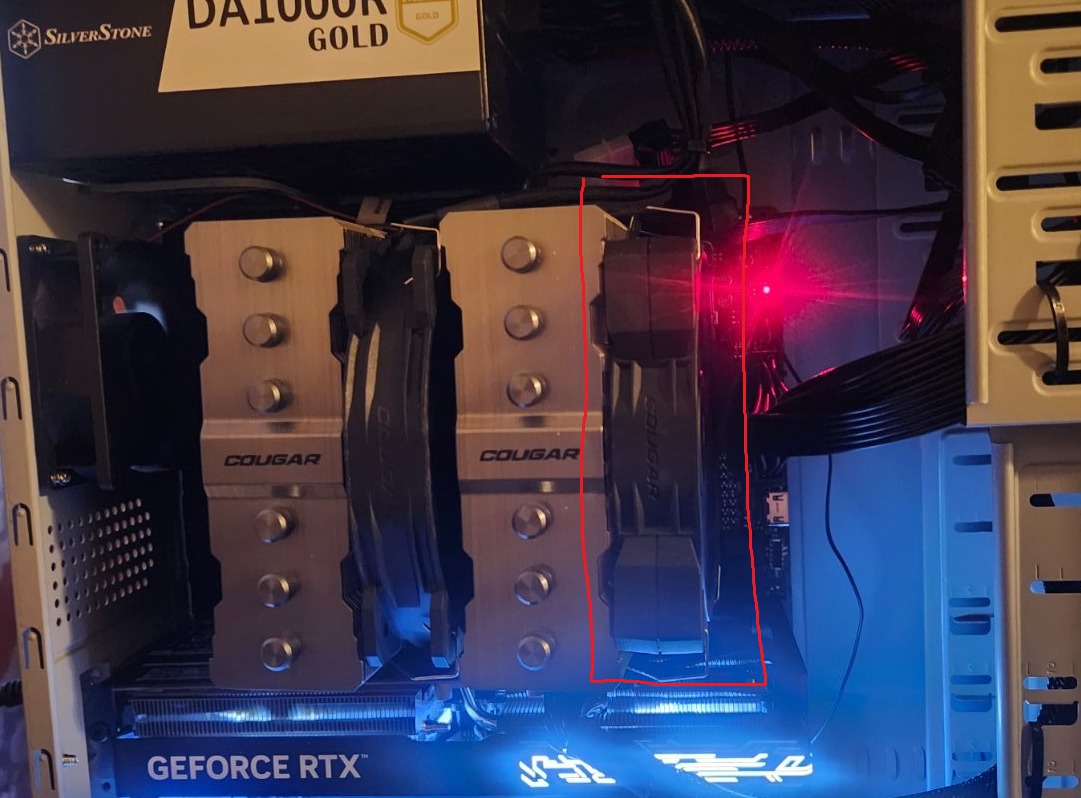
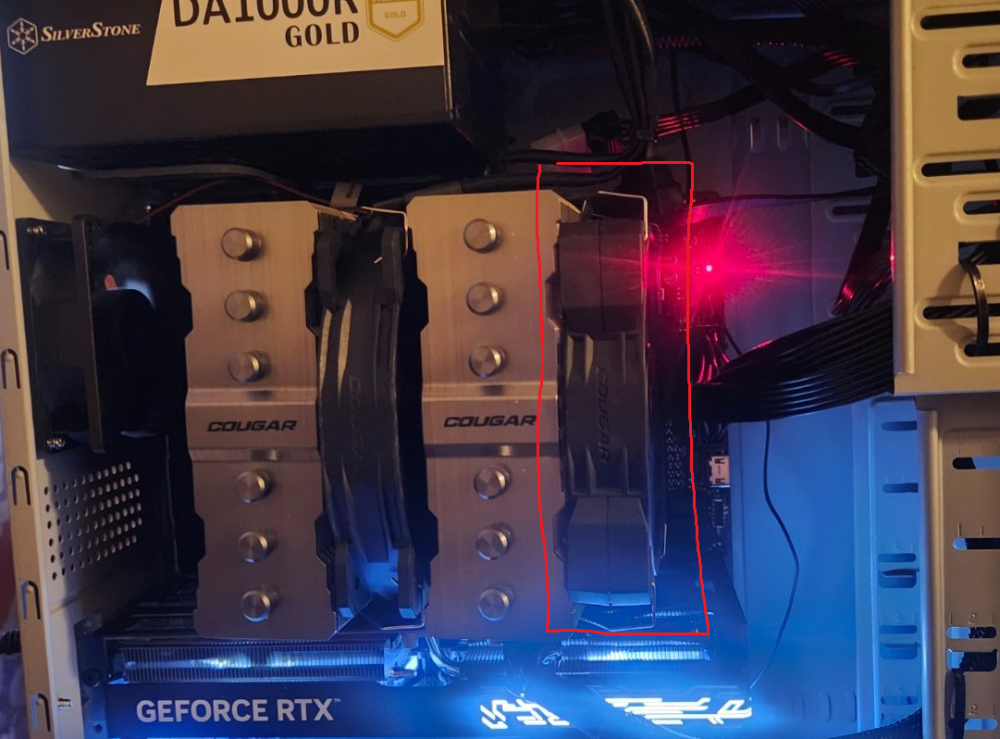
Pop this fan off, you just need to pull the metal clamps on each side of it, should come off easily, you should see some ram under there
-
Have you tried reseating the RAM? How about trying to boot with just one RAM stick and then just one of the other ones? They also need to be in the right slots based on the motherboards manual, sometimes that means A2 + B2 not A1 + A2. I'll let Waffles advise further though 🙂 thanks guys.
-
Congraulation Phoxly, you won the BEAST tier!!! We will halve the LP so everyone gets the opportunity to WIN! Contact email sent! If you missed it, here's the spin on our steam! - Did you know you can get a free entry for following the stream, another for subing / gifting a sub? Cheapest way to get entries now 🙂 https://www.twitch.tv/videos/2704083705?t=04h25m45s
-
Yep let's see the debug lights, also besat way to make sure the GPU is not loose is to simply reseat it, take it out entirely and plug it back in. In terms of cables, just make sure you are plugging them into the GPU, not the motherboard outputs on the back 🙂
-
Can you drop an image of how you have the monitor plugged into the back?
-
Hmm, shouldn't mess with cmos battery usually, wait for waffles to sort this out, if we need to replace anything we will.
-