

Macsusc
-
Posts
223 -
Joined
-
Last visited
-
Days Won
9
6 Followers


Macsusc's Achievements





-
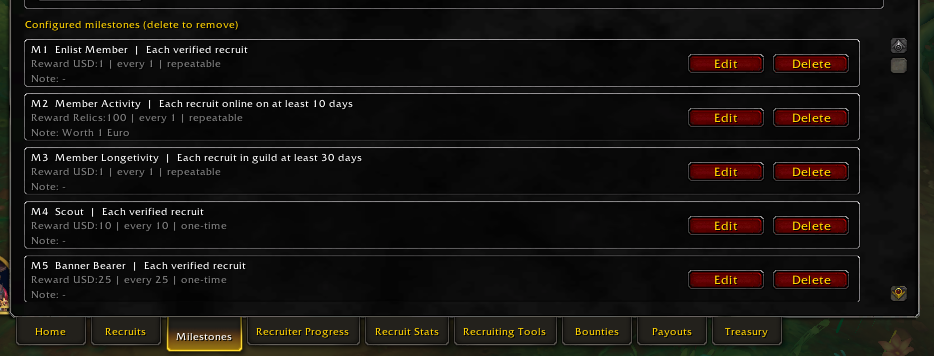
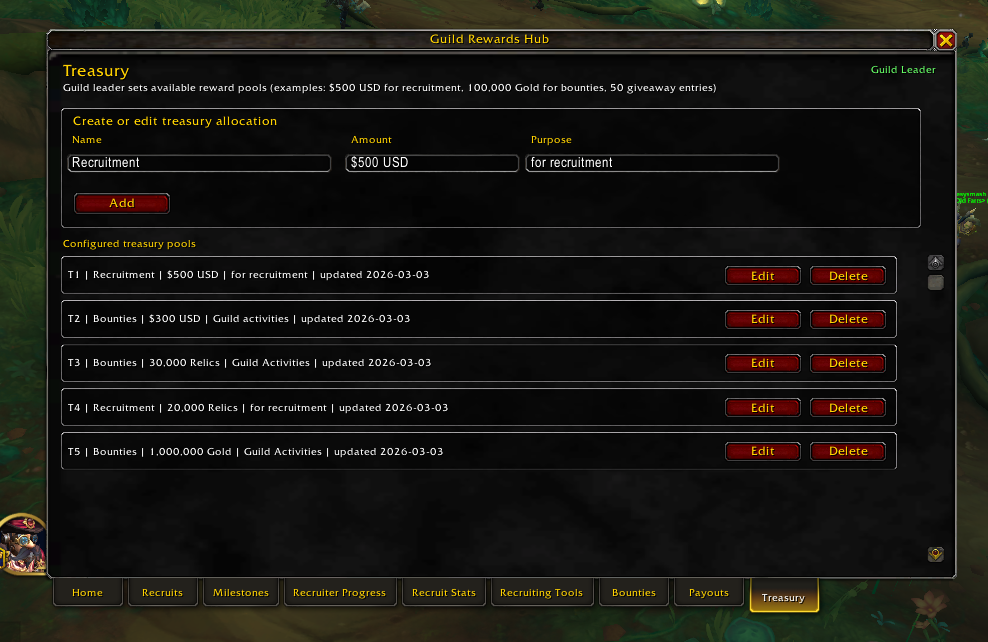
When you start the addon which you can get from here https://www.thecrimsonmarket.com/hub/files/category/13-addons/ You will see a Milestones tab, this is for recruiters. What you are seeing here is incentives to help us grow the guild. That's $1 for every person who joins, $100 relics (1 euro) for every person who is online atleast 10 days, $1 for every recruit who is in the guild for atleast 30 days. That's a total of approx $3 per person you recruit, that means you can earn $300 for recruiting 100 people. But wait there's more! There are milestones for 10, 25 and 50 recruits, coming in at $10, $25 and $50. Guys, I know this is awesome and an easy way to make some additional cash but please also try to source good player or atleast try to identify what type of players you are inviting, it would be good to know if the players are interested in Raids, PvP, Dungeons or what they bring to the table. For now, every single person in the guild is able to invite people and take advantage of this. We have $500 USD and 20,000 relics (200 EURO) in our guild Treasury for pay outs. After this is finished, we will evaluate the results and adjust accordingly to refill the Treasury. Let's make this the biggest WoW guild on the planet!

-
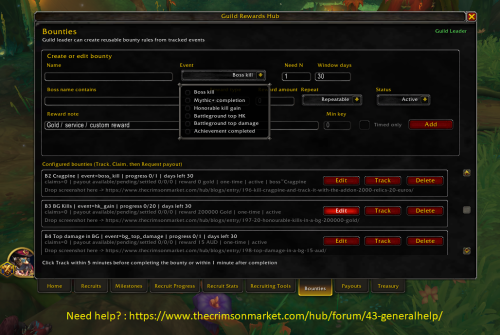
- Edit - Curseforge approved it -> https://www.curseforge.com/wow/addons/guild-rewards-hub Until curseforge approves it which should be a couple days we can download it and use it from here https://www.thecrimsonmarket.com/hub/files/category/13-addons/ Let me know if you find any bugs etc as we build this out. There are huge incentives for recruiters and bounty hunters. Recruiters: check the Recruiter Incentives tab in the club. Bounty Hunters: check the Giveaways/Bounties tab in the club. Here's our current budget for this in our Treasury in the addon. Once we empty this, we will re-evaulate everything and refill the Treasury 🙂
-
Version 1.0.0
2 downloads
Also available on CurseForge -> https://www.curseforge.com/wow/addons/guild-rewards-hub Addon installation process is the same as all addons. Extract the file contents into your World of Warcraft/_retail_/Interface/AddOns folder. Guild Rewards Hub - World of Warcraft Guild Giveaways and Bounties Guild Rewards Hub is a World of Warcraft addon built for guild leaders, officers, and recruiters who want to run a high-trust rewards program with fast payouts, clear milestones, and fun community events. This addon helps your WoW guild manage: - Recruit tracking and recruiter attribution - Milestones and reward rules - Bounties for raids, PvP, Mythic+, and community activities - Unified payout workflows for recruiting and bounty claims - Treasury budgeting across gold, cash, and giveaway entries - Recruiting tools, including who/whisper/invite support Why Guild Rewards Hub Guild Rewards Hub is designed for guild growth, retention, and transparency. It gives leaders a practical way to run structured giveaways and bounties while keeping budget decisions visible and payout actions consistent. The goal is simple: build a fun guild culture where members stay active, know how rewards work, and trust that payouts are handled quickly. Best Place for WoW Giveaways and Bounties Join our parent World of Warcraft club for guild news, event calendars, giveaways, and bounty updates: https://www.thecrimsonmarket.com/hub/clubs/20-world-of-warcraft This is where the best World of Warcraft Guild of Giveaways & Bounties exists. ------------------------------------------------------------------ World of Warcraft guild giveaways, WoW guild bounties, WoW recruiting addon, WoW payout tracker, WoW milestone rewards, WoW guild treasury, WoW guild management addon, guild giveaway events, WoW event calendar, World of Warcraft rewards system.Free -

Midnight LumberJack Housing - 1500 Relics (15 Euro)
Macsusc posted a blog entry in World of Warcraft's Giveaways/Bounties
Complete Midnight Lumberjack Housing achievement and post a screen shot here. Make sure to track it with the addon, if it doesn't track properly, let us know here so we can fix it! - Addon is available here until CurseForge approves it -> This is for the housing people! -
Make sure to track it with the addon, let us know if it doesn't track the event so we can fix it. Addon is available here until CurseForge approves it -> Drop a screenshot here.
-
20 Honourable KIlls in a BG - 200,000 Gold
Macsusc posted a blog entry in World of Warcraft's Giveaways/Bounties
Make sure you track it with the addon, if that doesn't work, let us know in a comment here so we can fix it. Addon is available here until CurseForge approves it -> Drop a screenshot here as well of your score. -
If the addon does not track the kill, please let us know below so we can fix it. Drop a screen shot of the kill here either way. Addon is available here until CurseForge approves it ->
-
Kill Lu'ashal & Track it with the addon - $20
Macsusc posted a blog entry in World of Warcraft's Giveaways/Bounties
Drop a screen shot here of the kill and make sure you have tracked it with the addon. If the addon failed to work then mention the details here so we can fix it as we work to make this addon better for our community. Addon is available here until CurseForge approves it -> -
First to reach 2k Rating in Arena - $100 AUD
Macsusc posted a blog entry in World of Warcraft's Giveaways/Bounties
Who's a PvP god here? Can we find some more? -
Hibernator PC
Macsusc replied to Cat_Dad8311's topic in PC Giveaway Community's Build & Technical Help
If the above does not work. Then we do this Do This Exactly Step 1: Download Latest BIOS On another computer: Go to Gigabyte support page for B850 AORUS ELITE WIFI7 Download latest BIOS Extract file Rename BIOS file to: GIGABYTE.bin (Required for Q-Flash Plus) Step 2: Prepare USB Format USB to FAT32 Copy only the renamed BIOS file to root Step 3: Flash BIOS Turn PC off Leave PSU plugged in and switched ON Insert USB into the white Q-Flash USB port (rear I/O) Press the Q-Flash Plus button The small LED should start blinking. Do NOT interrupt. Wait until blinking stops completely. Step 4: After Flash Completes Clear CMOS again Install one RAM stick in A2 Boot Since the computer was booting before, what may have happened is during your windows update, you either had the PC turn off due to a power surge or someone turned it off or it corrupted the BIOS for some othe reason. If we re install the bios and clear the cmos and it still does not run, I think we need to get either a new CPU or new ram sticks. -
Hibernator PC
Macsusc replied to Cat_Dad8311's topic in PC Giveaway Community's Build & Technical Help
Install just ONE stick in A2, second from the CPU cooler. While the PC is off. Then boot it up, send a pic of the motherboard at this time. If it doesn't boot, use the other ram stick in A2. -
Hibernator PC
Macsusc replied to Cat_Dad8311's topic in PC Giveaway Community's Build & Technical Help
Can you take a photo of the ram sticks and the positions they are seated in? They should be in A2 and B2 -
Hibernator PC
Macsusc replied to Cat_Dad8311's topic in PC Giveaway Community's Build & Technical Help
@Cat_Dad8311 do not give up, everything in life takes a bit of effort, this type of stuff happens to everyone, we just need to get through it together and we will. We can order you new RAM we just need to confirm that the RAM is dead, the computer initially booted up for you and went into a Windows update correct? It is very strange that the RAM would have suddenly had a fault after this. We just need to make sure that the RAM 100% needs to be replaced before we make the order for you. Can you confirm that you were taking the RAM out and reseating it with the computer OFF before turning it ON again? @AlmightyWaffles can you please double check the motherboard manual to confirm which slots the RAM should be seated in? Also check the manual for any other reasons the DRAM can be lighting up. -
As the title says, let's get some profession gods in here 🙂 Claimed by BouncingDan - Babydrak