Skip to content
View in the app

A better way to browse. Learn more.

The Crimson Market

A full-screen app on your home screen with push notifications, badges and more.

To install this app on iOS and iPadOS
  1. Tap the Share icon in Safari
  2. Scroll the menu and tap Add to Home Screen.
  3. Tap Add in the top-right corner.
To install this app on Android
  1. Tap the 3-dot menu (⋮) in the top-right corner of the browser.
  2. Tap Add to Home screen or Install app.
  3. Confirm by tapping Install.

News

Monthly Console & Gaming Reward!

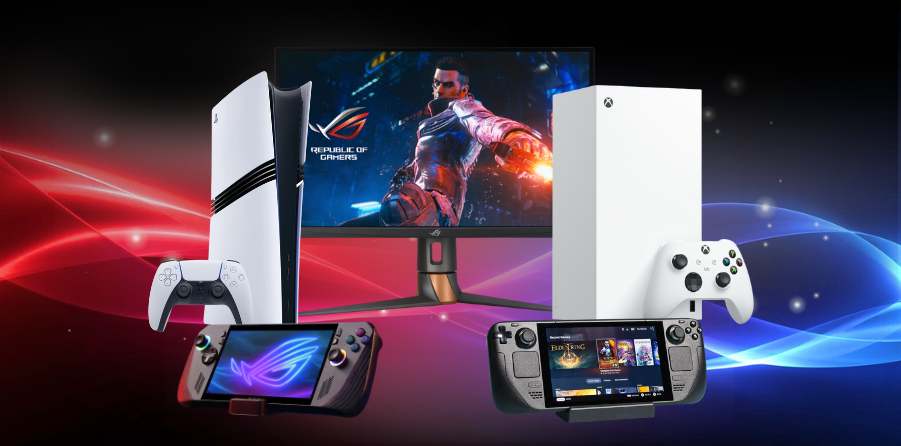
Hey everyone! We have an exciting Monthly Supplemental Reward coming up and you do not want to miss this. You’ll have a chance to win one of these amazing prizes:

Xbox Series X
ROG Swift PG27AQN
Steam Deck
ASUS ROG Handheld
PlayStation 5 Pro

If you want to read more about how the rewards work, you can check the details here:
👉 https://www.thecrimsonmarket.com/consolegiveaway

Come hang out with us live and watch the winner get picked.
📅 December 6, 2025
🕒 2:00 PM CST
Tune in on Twitch: https://www.twitch.tv/crimsonlootcarnival

Hope to see you there. Good luck! 

Edited by Kittrix

Recommended Comments

There are no comments to display.

Please sign in to comment

You will be able to leave a comment after signing in

Sign In Now

Account

Navigation

Search

Search

Configure browser push notifications

Chrome (Android)
  1. Tap the lock icon next to the address bar.
  2. Tap Permissions → Notifications.
  3. Adjust your preference.
Chrome (Desktop)
  1. Click the padlock icon in the address bar.
  2. Select Site settings.
  3. Find Notifications and adjust your preference.