
All Activity
- Past hour
-
 MarcoHiruma#2700 joined the community
 - Today
-
 Magraomori#2880 joined the community
 -
 SteveEnd#11845 joined the community
 -
 HitAndRun#21802 joined the community
 -
 NexusDEreal#2820 joined the community
 -
 TiltedZephi#2753 joined the community
 -
 buzzkill00 joined the community
 -
 youhaveatinyface joined the community
 -
 Gregore#11205 joined the community
 -
 Radegast#11527 joined the community
 -
What is the Defibrillator, and why should I use it? The Defibrillator is a Rare Quick Use item designed to revive downed Raiders quickly and restore a significant amount of health. Compared to a normal revive, it is faster and gives your teammate more HP, which can be crucial in high-stakes raids. In practice, you’ll usually use the Defibrillator when a Raider is down in a dangerous area, and you need them back on their feet fast to continue the mission. Even if the Raider is not in your immediate party, you can revive them Topside. This makes it versatile for team play and solo support. Key stats: Healing: 50 HP Use time: 1.5 seconds Stack size: 3 per inventory slot Weight: 0.75 Sell Price: 1,000 coins The quick use time means you don’t have to leave cover for long, which is often the difference between keeping your team alive or losing a Raider. Where can I get Defibrillators? There are a few reliable ways to acquire them: Scavenging: Random drops in the world occasionally include Defibrillators. Free Loadout: They have a chance to appear here if you’re lucky. Crafting: You can craft them if you have the blueprint and materials. Merchants: Certain vendors, like Lance, will sell them directly. Most experienced players rely on a combination of scavenging and crafting because buying them can become expensive if you go through them frequently. For players looking to monetize extra items, you can also sell ARC Raiders items for cash on U4N, which is useful if you accumulate a lot of rare items you don’t need. What materials do I need to craft a Defibrillator? Crafting a Defibrillator requires specific resources and a blueprint. You can only craft it at Medical Lab 2, and you must have learned the Defibrillator Blueprint beforehand. Materials required: 9 × Plastic Parts 1 × Moss Crafting yields 1 Defibrillator per batch. Practical tip: Many players stockpile Plastic Parts because they are used in multiple rare items. Moss can be gathered during exploration or from specific scavenging points. Crafting a small batch at a time ensures you don’t waste resources if you get interrupted during a raid. Can I recycle or salvage Defibrillators? Yes. If you have extra Defibrillators or don’t want them, you can recover materials through recycling or salvaging. Recycling: Returns 1 × Plastic Parts and 1 × Moss. Salvaging: Yields 2 × Chemicals. In practice, recycling is a way to regain the basic crafting materials, while salvaging gives you chemicals, which are used in other advanced crafting recipes. Most players only salvage when they need chemicals, otherwise recycling is more efficient for restocking basic resources. How should I use the Defibrillator in raids? Timing and positioning are key. Here’s what to keep in mind: Prioritize downed Raiders in dangerous zones. The faster they revive, the less chance enemies have to finish them off. Use cover when reviving. Even though it only takes 1.5 seconds, enemies can still interrupt you if you’re exposed. Stack strategically. Since you can carry up to 3 in a stack, it’s wise to have at least one ready for emergencies and another to keep in reserve. Players often find that a Defibrillator is most useful in missions with multiple hazards or when coordinating larger raids. If your team is running light on medical support, having one or two Defibrillators can prevent costly downtime. Common mistakes players make Using it on low-priority targets: Save it for Raiders who are actively participating in the raid or who can make a difference if revived quickly. Crafting in large batches without storage: If your inventory is full, crafted Defibrillators might sit unused or force you to discard other valuable items. Ignoring alternative acquisition methods: Many players buy them impulsively, but scavenging and free loadouts often provide enough for normal gameplay. The Defibrillator is a rare but highly effective Quick Use item in ARC Raiders. It allows for faster revives with more health than standard options, making it essential for team survival in difficult missions. Knowing how to craft it, when to use it, and how to manage your supply can improve your raid efficiency significantly. Remember: stockpile materials like Plastic Parts and Moss, learn the blueprint, and keep one Defibrillator ready at all times. And if you end up with extras, you can sell ARC Raiders items for cash on U4N to recoup some in-game currency. Mastering the Defibrillator isn’t just about having one—it’s about using it smartly, in the right situations, to keep your team alive and moving. Builds That Work: Arc Raiders Bobcat Blueprint Locations, How to get & Crafting Guide
- Last week
-
Selling Mythic goblin run 3 billion per spot Max#1372 Thank you 😊
- Earlier
-

Illusionator PC crashing/powering off while gaming
DaWalrus replied to DaWalrus's topic in Computers's Build & Technical Help
Hi, just checking in again to see if I can get that invoice or receipt for the GPU. Thank you. -
Build video is up. We also ran it through the rate my pc app. https://www.thecrimsonmarket.com/ratemypc/builds
-

Kris Kringle - Black Box - For Family & Friends
Razboss commented on Macsusc's raffle in Public Raffle
 Congrats Cat Dad!!!
 -
 Joseph chilton changed their profile photo
 -

Kris Kringle - Black Box - For Family & Friends
Macsusc commented on Macsusc's raffle in Public Raffle
I'll make sure it's not the white ones -

Kris Kringle - Black Box - For Family & Friends
Cat_Dad8311 commented on Macsusc's raffle in Public Raffle
Omg I woke up from a nap and saw. I told my wife she will record and I can not wait. She said if it's your dirty underwear though shes going to have words with you. -

Kris Kringle - Black Box - For Family & Friends
HoneyBadger#1772 commented on Macsusc's raffle in Public Raffle
Congratulations CatDad! I hope you tell mikahell what is in the box. -
Illusionator PC crashing/powering off while gaming
DaWalrus replied to DaWalrus's topic in Computers's Build & Technical Help
Hello, I am still in the process of resolving this with XFX. They sent out a fan so replace my original one and I am still having the same problems. They just asked me for a jpeg or pdf of the invoice for the GPU, to move along with the warranty servicing. Would it be possible for someone to send that to me? Thank you. -
Illusionator PC crashing/powering off while gaming
Macsusc replied to DaWalrus's topic in Computers's Build & Technical Help
Hey how did you go with the support ticket? Did they help you out? Let us know how we can help further 🙂 -
Let us know what you think in a comment below 🙂
-
-

GiftForge uplift!
mikahelll1 commented on Macsusc's blog entry in Member Benefits & Platform Development's Updates
Night and day difference. -
Congratulations Razboss!! I love to see someone who really participates in our community get a big reward! This one made me really happy and actually it was just as much of a Birthday present for me as it was a Christmas present for Razboss 🙂 Now as all our winners, the Loyalty Points do get halved so everyone else can have a shot at getting to the top and winning! Here's the highlight! https://www.twitch.tv/videos/2650279641 We will do our next big reward in 28 days. Thanks to everyone who tuned in today!
-
Kris Kringle - Black Box - For Family & Friends
Macsusc commented on Macsusc's raffle in Public Raffle
Secret 🙂 However shipping this large of a box might have been a totally over kill idea LOL! -
 onep43553games changed their profile photo
 -
 Amza changed their profile photo
 -
Kris Kringle - Black Box - For Family & Friends
mikahelll1 commented on Macsusc's raffle in Public Raffle
what is in the box? gimme -
Looking good 🙂
-
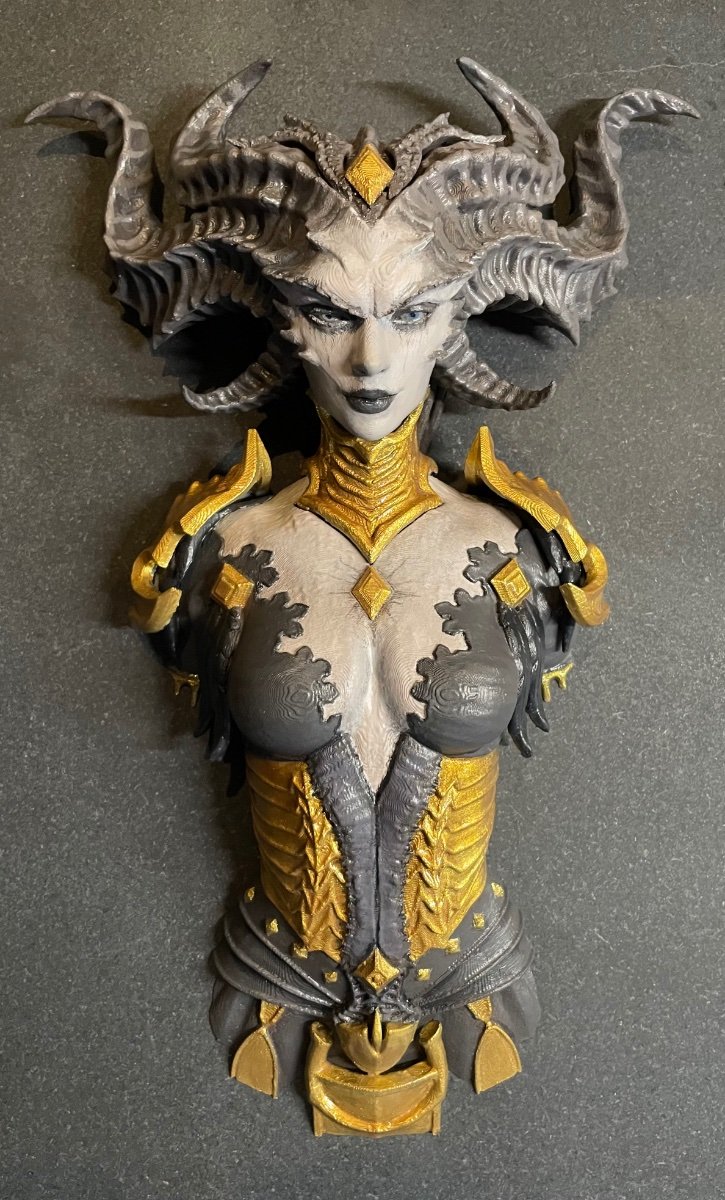
Waiting 3 weeks to get my bandsaw fixed, just needed a few bits of rubber but finally could do the grinding to fit the head on. When I separated the head from the body in the software it left a few open faces and the 3d printer software corrected it but made the part a different shape. So the head wouldn’t slide on easy. I used the bandsaw to cut off the excess you will see it in the build video. Band saw is great because it cuts vertical.

-
 🔥 T4 – Bosses Run 🔥 (Duriel, Andariel, Zir, Grigoire, Varshan, Belial, Urivar) Offering Torment IV boss runs – fast and efficient clears of all major bosses. ✅ Quick & safe kills ✅ You just join – I handle everything ✅ Great for Unique, Ancestral Unique ✅ Perfect for farming & endgame progression 📌 Requirements: – Torment IV (T4) unlocked - Boss materials to open your chest 💬 Message me to schedule your T4 boss runs!
 -
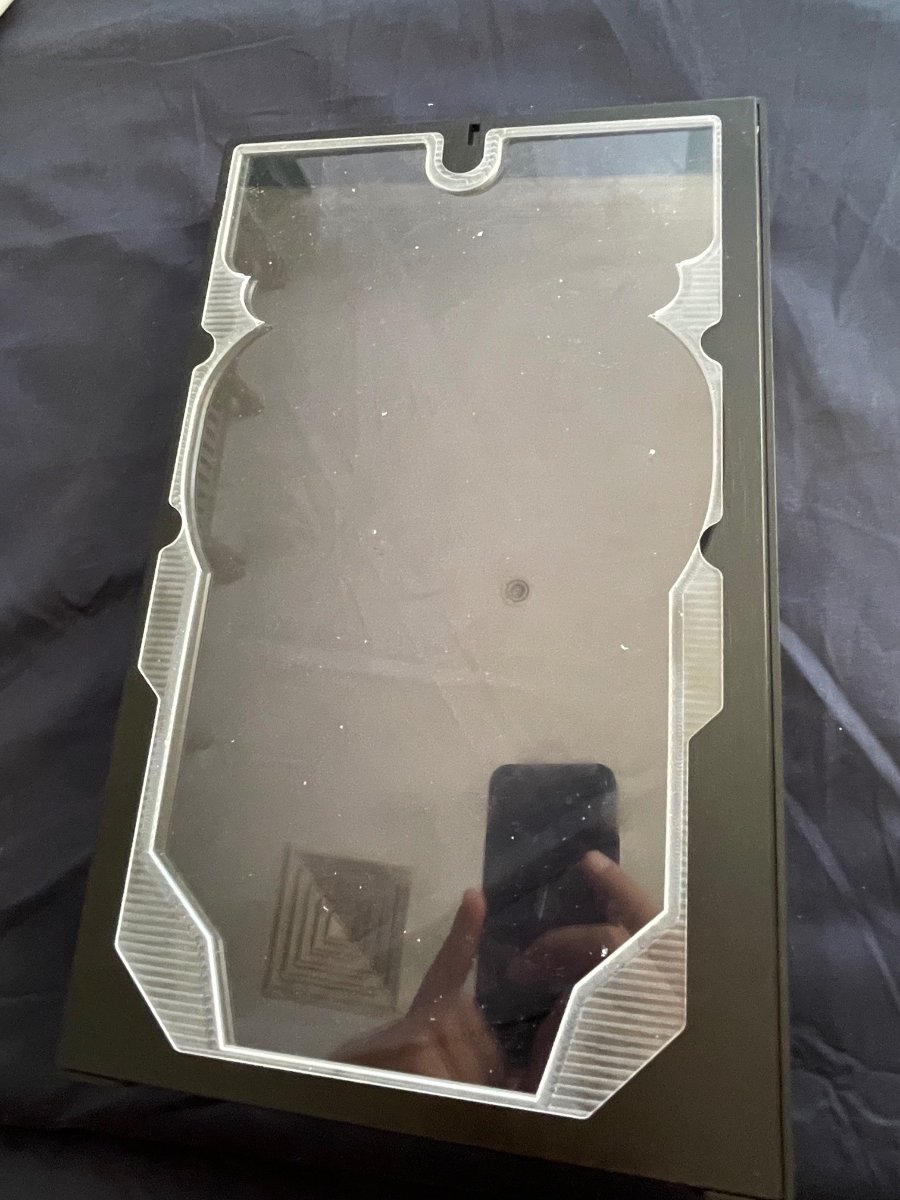
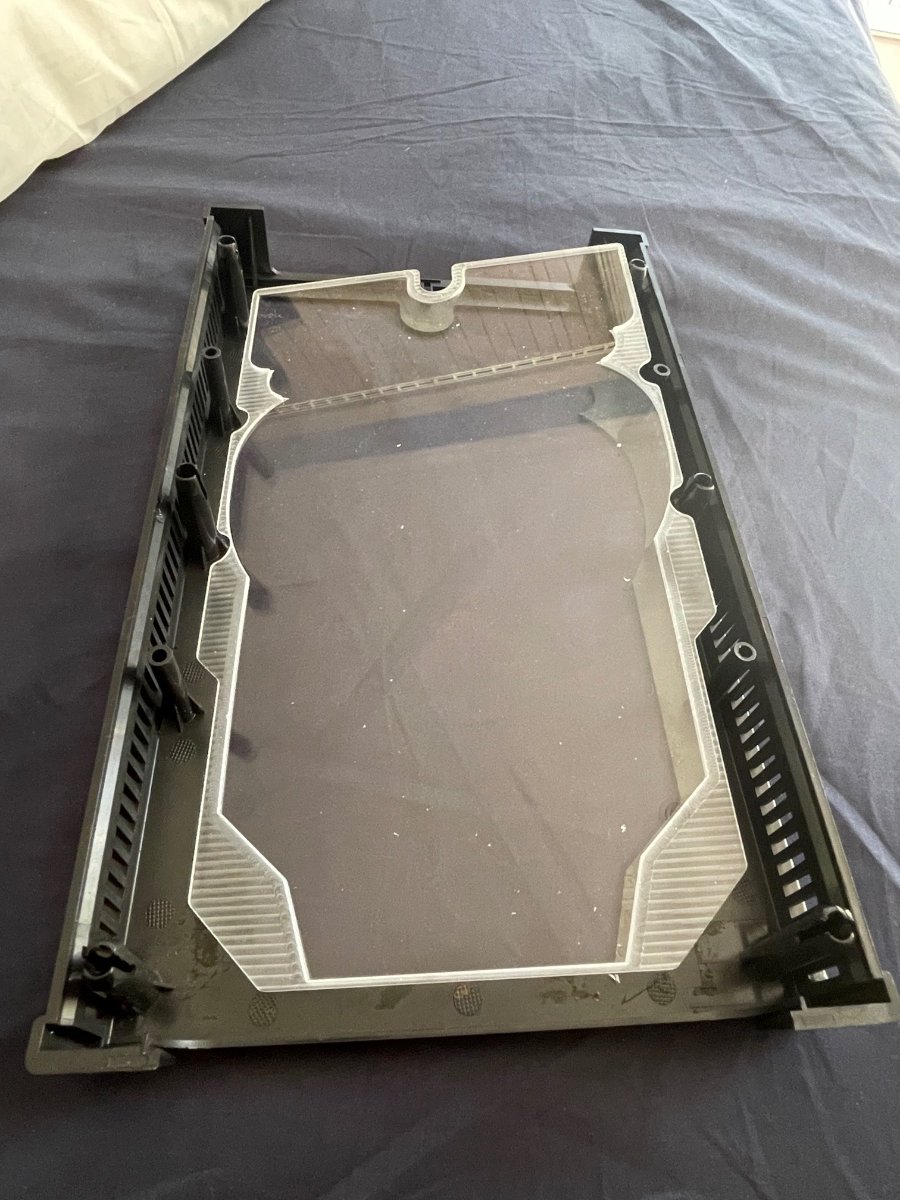
Second attempt at cutting panel, after 16 hours of reprogramming and reprocessing I may have a solid program for this. IMG_4882.mov
-
First attempts at cutting the acrylic and case panel. The case panel is now in modifiable because there is no reference point to re align the cutting with the existing cuts made. Unfortunately the model didn’t take into account the location of the pegs so the sheet doesn’t quite fit, will need to redo and also the tolerance was too tight. This is early days for cnc milling on the Carvera. Already 3 tools broken since the software was picking speeds from library and not the tools designated speed. Lessons learned with every snapped bit. IMG_4858.mov IMG_4874.mov
-
Illusionator PC crashing/powering off while gaming
DaWalrus replied to DaWalrus's topic in Computers's Build & Technical Help
Thank you for your help. I just put in a support ticket with XFX. I can update this thread when I receive the fixed card/ new card to confirm that the issue is resolved. -
 Since the fans don't spin at all when the PC is booted on, then it extremely likely to be either the internal fan power connector on the PCB or the card's fan control circuitry must be defective, now due to the item still being under warranty, the next step is to send the GPU itself back to the manufacturer for RMA (Return Merchandise Authorization), where they would determine whether or not it is able to be fixed or if it just needs to be replaced.
 -
Illusionator PC crashing/powering off while gaming
DaWalrus replied to DaWalrus's topic in Computers's Build & Technical Help
The fans do not spin when the pc is booted. I tried to use MSI Afterburner yesterday to try to do exactly what you said and they didn’t respond. Also when I installed Afterburner I had uninstalled Adrenaline just in case there was a software conflict. -
Gday, this sucks to hear you're going through this DaWalrus. Now firstly, I would start by installing MSI AFTERBURNER, and seeing if the fans will spin if forced to. If you have used MSI Afterburner to force the fans on your brand new XFX Swift Radeon 9070XT to a set speed (e.g., 50% or 100%) and they still do not spin, this strongly indicates a hardware issue or a software conflict. Which could mean either there is a conflict of power between AMD Adrenalin and MSI Afterburner, or since the card is brand new and software control is failing, the fans themselves, the internal fan power connector on the PCB, or the card's fan control circuitry might be defective. A key indicator of this is that the fans likely do not spin briefly when you first boot your PC. Do the fans slightly spin, or move at all when you first power on the PC?