
Skip to content
View in the app

A better way to browse. Learn more.

The Crimson Market

A full-screen app on your home screen with push notifications, badges and more.

To install this app on iOS and iPadOS
  1. Tap the Share icon in Safari
  2. Scroll the menu and tap Add to Home Screen.
  3. Tap Add in the top-right corner.
To install this app on Android
  1. Tap the 3-dot menu (⋮) in the top-right corner of the browser.
  2. Tap Add to Home screen or Install app.
  3. Confirm by tapping Install.

News

Arc Raiders: Trophy Display Project Cheat Sheet

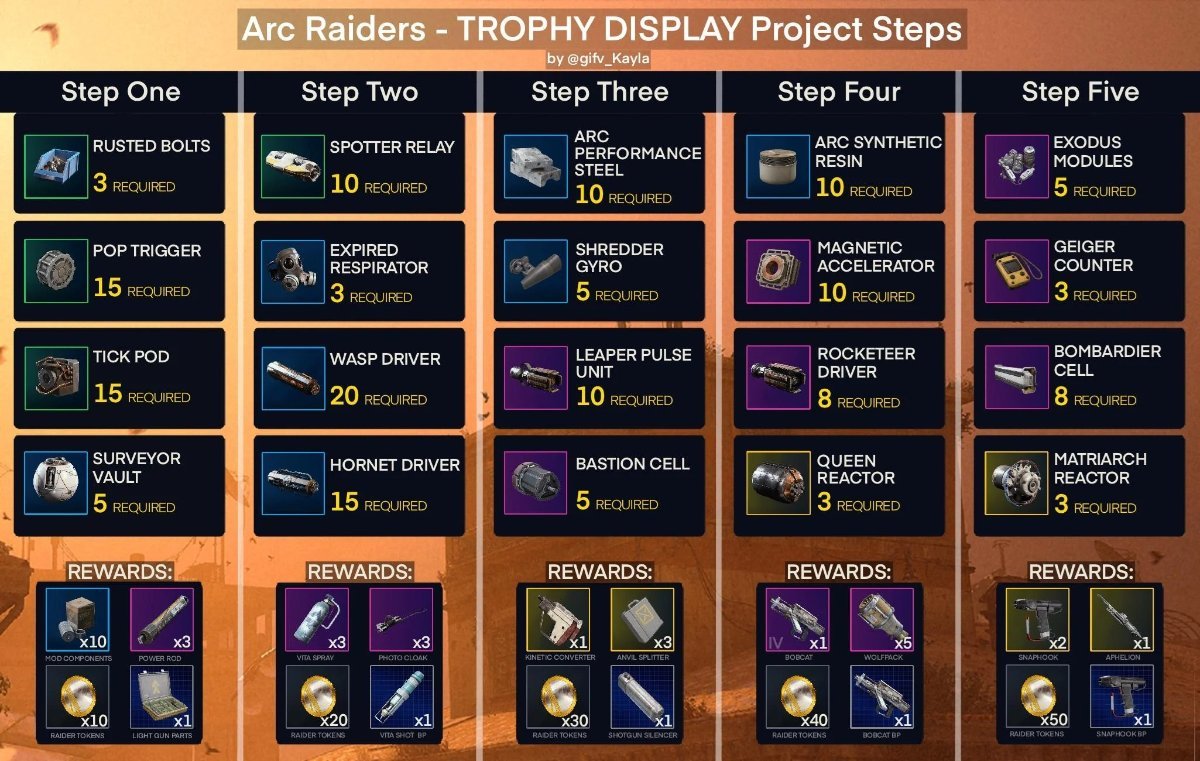
image.thumb.jpeg.419b7340dcc1980716010565ed7e5798.jpeg


Here are the requirements for the new Trophy Display Project introduced to Arc Raiders. More than likely this project has no deadline, allowing you to complete it on your own pace. If you want, you might be able to complete it after the next expedition to give you a good head start on some decent gear and blueprints.

Most notable rewards from this project are from step 4 and 5. Giving players a rank 4 bobcat and its Blueprint, along with legendary weapon, Aphelion, and snaphook blueprint for Step 5.

Keep in mind, some of these items are map specific, I.E. Shredder Gyros and Geiger Counter (Stella Montis). Everything else can be obtained almost anywhere else.

Good luck and good hunting Raides!

New Bitmap image.bmp

0 Comments

Recommended Comments

There are no comments to display.

Guest
Add a comment...

Account

Navigation

Search

Search

Configure browser push notifications

Chrome (Android)
  1. Tap the lock icon next to the address bar.
  2. Tap Permissions → Notifications.
  3. Adjust your preference.
Chrome (Desktop)
  1. Click the padlock icon in the address bar.
  2. Select Site settings.
  3. Find Notifications and adjust your preference.