

Skip to content
View in the app

A better way to browse. Learn more.

The Crimson Market

A full-screen app on your home screen with push notifications, badges and more.

To install this app on iOS and iPadOS
  1. Tap the Share icon in Safari
  2. Scroll the menu and tap Add to Home Screen.
  3. Tap Add in the top-right corner.
To install this app on Android
  1. Tap the 3-dot menu (⋮) in the top-right corner of the browser.
  2. Tap Add to Home screen or Install app.
  3. Confirm by tapping Install.

News

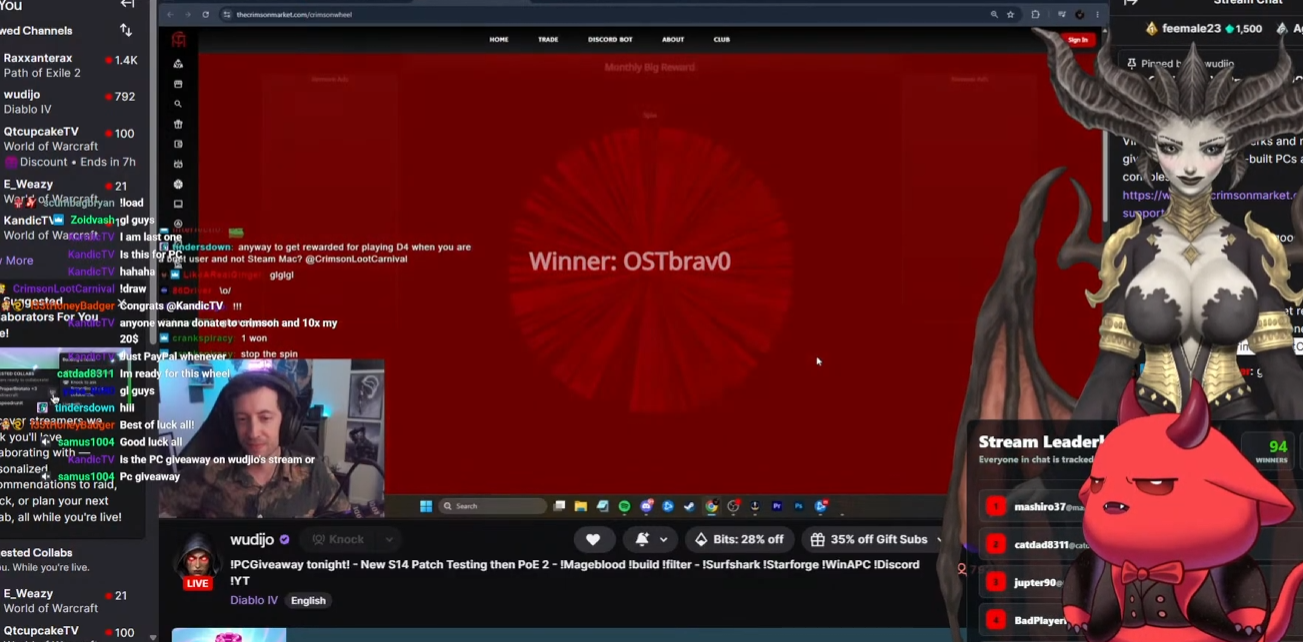
Congratulations OSTBrav0 - Winner of our monthly PC Giveaway!

The LP will now be halved for this member.

Check our the recap here : 

Thank you so much for being a member and supporting us!

You won the COOKED PC!
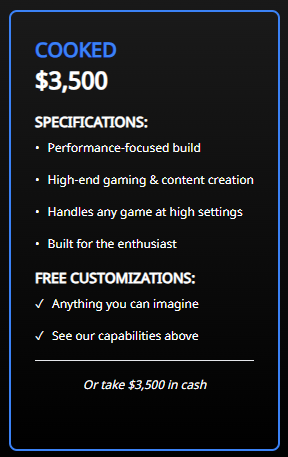
image.png.0675c756bbfb56cdb5728bb38df04fda.png

The delivery management system will reach out every 2 days to facilitate the delivery through DHL! 

OSTbrav0 Congratulations! Guys please congratulation our winning member of the community ❤️ 

1 Comment

Recommended Comments

Elisian

Members

Congrats on the win!  It's good seeing someone who has been a member for a while getting their turn! 

Guest
Add a comment...

Account

Navigation

Search

Search

Configure browser push notifications

Chrome (Android)
  1. Tap the lock icon next to the address bar.
  2. Tap Permissions → Notifications.
  3. Adjust your preference.
Chrome (Desktop)
  1. Click the padlock icon in the address bar.
  2. Select Site settings.
  3. Find Notifications and adjust your preference.
